Manual CSV Exports
Every status check meant logging into WooCommerce, filtering by status, exporting, and dropping the file into a shared sheet by hand.
A scheduled n8n automation that keeps AIEM's WooCommerce course orders mirrored to a live Google Sheet every 30 minutes — pending and completed orders refreshed automatically, no manual exports, no stale data.
AIEM — the African Institute of Emergency Medicine — runs a medical training academy that sells courses through a WooCommerce-powered store. The admin team needed live visibility into pending and completed orders without manually exporting CSVs or logging into WordPress. The fix: a scheduled n8n automation that pushes data straight into the Google Sheet they already use every day.
African Institute of Emergency Medicine (AIEM) — medical training academy selling continuing-education courses online to South African healthcare practitioners.
n8n (self-hosted), WooCommerce REST API, and Google Sheets. Africa/Johannesburg timezone, running on a 30-minute schedule.
Live in production. Created January 2026, last updated April 2026. Continues to refresh order data 48 times a day without manual intervention.
Administrators needed a single live view of course orders, broken out by status — but the existing workflow forced them back into the WordPress dashboard every time they needed an answer.
Every status check meant logging into WooCommerce, filtering by status, exporting, and dropping the file into a shared sheet by hand.
By the time the spreadsheet was current, the WooCommerce store had moved on — pending orders had been paid, completed orders had been refunded.
To see the same data, every team member needed WooCommerce admin credentials — a permissions surface AIEM didn't want to keep widening.
The team wanted pending and completed orders in separate tabs — something the WooCommerce export flow didn't produce without extra work.
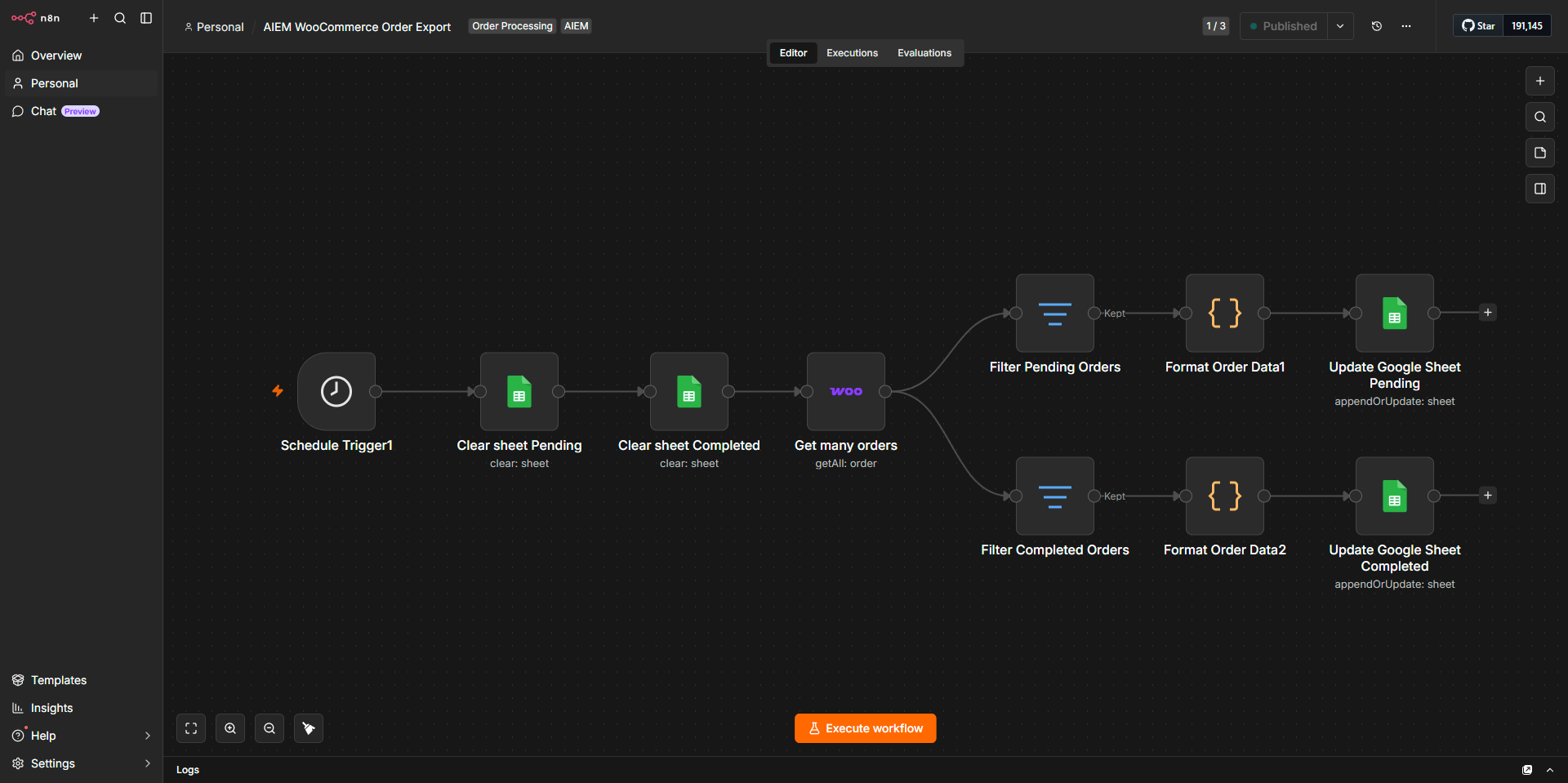
A scheduled n8n automation that runs every 30 minutes, clears both sheet tabs, and refreshes them with the latest order data — split cleanly into Pending and Completed, with one row per product per order.
Wipes rows 2–500 on the Pending tab so old data can't bleed through into the next sync.
Same operation on the Completed tab — both sheets start each run from a clean slate.
Pulls every WooCommerce order placed after 1 February 2026 via the REST API.
Two filter nodes route orders into two streams — one for status = pending, one for status = completed.
A code node flattens nested order data into clean, spreadsheet-friendly rows — one row per product per order.
Appends to each tab using append-or-update logic, matching on Order Number so duplicates never appear.
A single trigger fans out into two parallel writes — same data shape, different status filter.
Eight nodes, three services, one schedule. No webhook layer, no external orchestrator — n8n on its own.
| Node | Type | Purpose |
|---|---|---|
Schedule Trigger |
Trigger | Fires every 30 minutes |
Google Sheets ×2 |
Action | Clears rows 2–500 on both tabs before refresh |
WooCommerce |
Action | Fetches all qualifying orders with date filter |
Filter ×2 |
Logic | Splits orders by status = pending / completed |
Code ×2 |
Transform | Flattens nested order + line_item data into a row per product |
Google Sheets ×2 |
Action | Writes formatted rows, matching on Order Number |
Every order is exploded into one row per purchased product, with the customer, billing, shipping, and item detail flattened side-by-side.
Honest notes on the workflow as it stands — what's a deliberate trade-off, what's a small efficiency opportunity, and what's worth keeping an eye on as volumes grow.
Hardcoded row ceiling. The clear operation targets rows 2–500, which is a safe ceiling for now. If order volume ever exceeds 500 rows in a single sync, anything beyond row 500 wouldn't be cleared. Worth making rowsToDelete dynamic as the catalogue grows.
Annual date filter. The after: 2026-02-01 WooCommerce filter means only 2026 orders are fetched. This is intentional — but it should be bumped each January, or refactored into a config variable so it isn't a silent stale-data trap.
Duplicate formatter. The two Format Order Data code nodes are identical. They could be consolidated upstream of the filter split — minor efficiency win, not a bug.
No error branch. A failed WooCommerce API call would silently result in two blank sheets on the next run. Adding an error branch with a Slack or email notification would harden it against quiet failures.
returnAll on every run. The entire qualifying order set is fetched on each cycle. Fine for current volumes; at higher scale, pagination or an incremental "modified since" cursor would be the next step.
Timezone set correctly. Workflow runs on Africa/Johannesburg — order dates and sync timestamps line up with the team's working hours.
If your team is exporting CSVs, copy-pasting between dashboards, or chasing data across three systems — there's almost certainly a small, sturdy automation that can take that off your plate. Let's talk.
Work like this sits under AI & Automation services — n8n workflow design, scheduled syncs, WooCommerce + Google Sheets integration, and structured data pipelines.
Related: see the AIEM Auto-Enrolment workflow running on the same n8n instance — WooCommerce purchases into LearnWorlds course access in under five minutes.