Two Identity Systems
A WooCommerce customer is not automatically a LearnWorlds user — emails have to be cross-checked manually before enrolment can even begin.
A scheduled n8n automation that turns a WooCommerce course purchase into a live LearnWorlds enrollment in under five minutes — looks up the student, checks if they're already enrolled, and only acts when there's something to do. Idempotent by design.
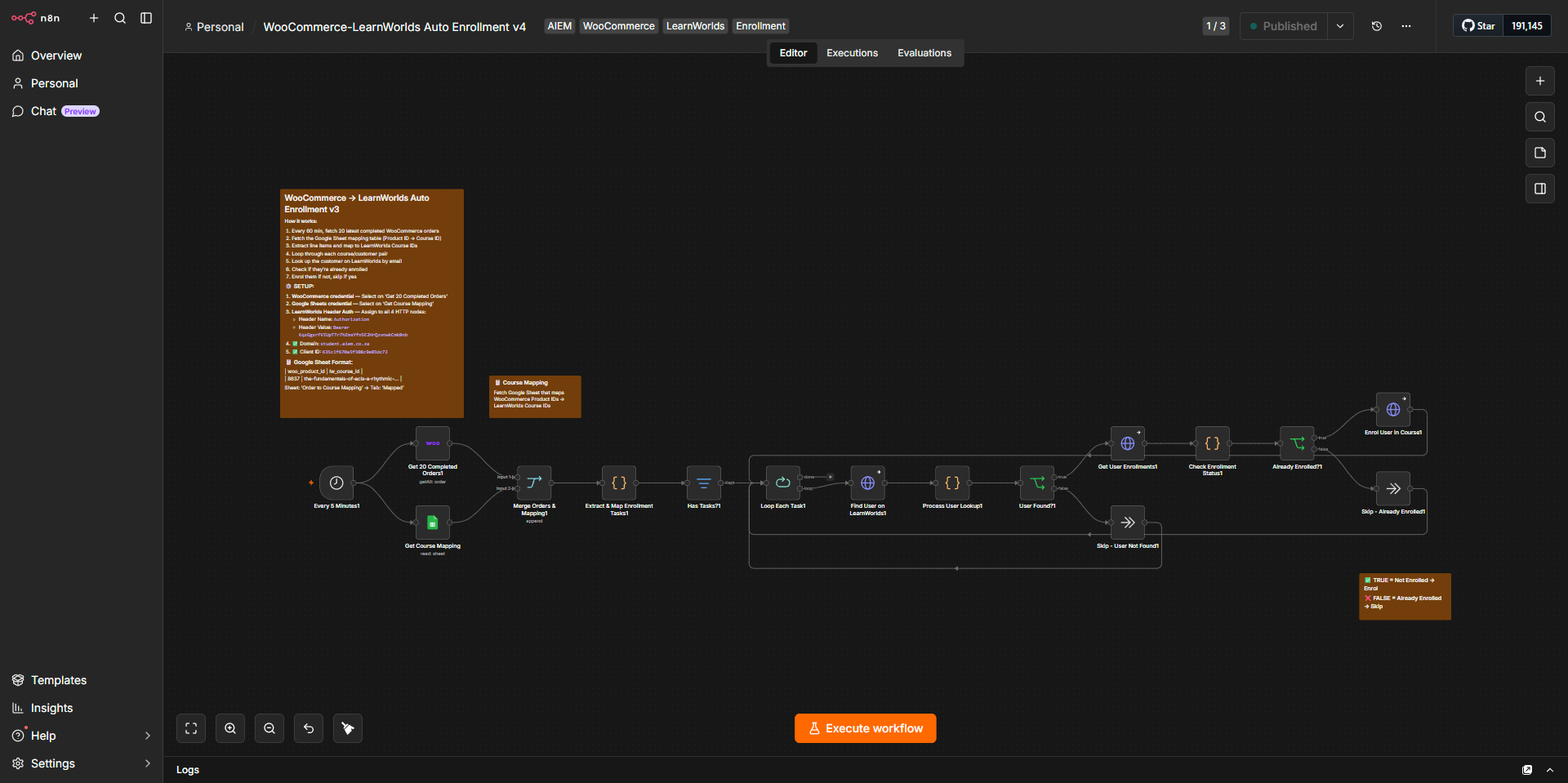
AIEM sells medical training courses through a WordPress / WooCommerce store but delivers them through LearnWorlds — their LMS at student.aiem.co.za. The two systems don't talk natively. This n8n automation is the bridge between them: every completed purchase becomes a LearnWorlds enrollment, automatically, within five minutes.
African Institute of Emergency Medicine (AIEM) — medical training academy running both a WooCommerce storefront and a LearnWorlds LMS.
n8n (self-hosted), WooCommerce REST API, LearnWorlds Admin API v2, Google Sheets as a config layer. Africa/Johannesburg timezone.
Live in production. Created February 2026, most recently updated May 2026 — AIEM's most active workflow.
WooCommerce knows who paid for what. LearnWorlds decides who gets access to which course. Until this workflow shipped, the only thing bridging them was a human with two browser tabs open.
A WooCommerce customer is not automatically a LearnWorlds user — emails have to be cross-checked manually before enrolment can even begin.
WooCommerce Product IDs and LearnWorlds Course IDs use completely different identifiers — there's no off-the-shelf connector that knows the mapping.
Each manual enrolment took several minutes — fine on a slow week, painful on a busy one, and bad for students stuck waiting on a paid-for course.
Without a check, a re-processed order or a refund-then-rebuy could enrol a student twice — corrupting course records and confusing reporting.
Every five minutes, the workflow pulls the 20 most recent completed orders, cross-references a Google Sheet mapping table, and runs each enrolment through a careful lookup-then-act loop.
Pulls the 20 most recent completed WooCommerce orders via the REST API.
Reads the Order to Course Mapping Google Sheet to translate WooCommerce Product IDs to LearnWorlds Course IDs.
A code node flattens line items and produces a clean list of { email, woo_order_id, lw_course_id } enrolment tasks.
For each task, finds the student on LearnWorlds by email and fetches their current enrolments.
If the student isn't already on the course, POST a new enrolment. If they are, log and skip — no double-enrolments, ever.
One trigger, three HTTP calls per task, and two safe-skip branches — the whole thing is built around "check before you act".
Four design choices that shape how this workflow behaves under stress, under repetition, and under non-technical hands.
Rather than hard-coding product-to-course mappings inside the workflow, the mapping lives in a Google Sheet (Order to Course Mapping, tab: Mapped). AIEM's admins can add new courses without touching n8n — the code node reads the sheet and builds a lookup dictionary at runtime.
The workflow checks existing enrolments before acting. A student who buys the same course twice — or whose order is re-processed — will not be enrolled twice. The Already Enrolled? branch handles repetition gracefully.
All three HTTP Request nodes use continueRegularOutput on error. A failed API call for one student doesn't halt processing for the rest of the batch — quiet failures are bounded to a single task.
If a WooCommerce product has no entry in the mapping sheet, the code node logs it to the console rather than crashing — visibility into gaps without breaking the workflow for everyone else.
Three endpoints from the LearnWorlds Admin v2 API do all the talking — auth via HTTP header (Lw-Client) plus a Bearer token kept out of the workflow JSON.
| Method | Endpoint | Purpose |
|---|---|---|
| GET | /admin/api/v2/users/{email} |
Look up student by email |
| GET | /admin/api/v2/users/{id}/enrollment |
Fetch student's current enrolments |
| POST | /admin/api/v2/users/{id}/enrollment |
Enrol student in a course |
Fifteen nodes, four services, one purpose: a sale becomes access, without anyone having to know it happened.
| Node | Type | Purpose |
|---|---|---|
Schedule Trigger |
Trigger | Fires every 5 minutes |
WooCommerce |
Action | Fetches 20 most recent completed orders |
Google Sheets |
Action | Reads product-to-course mapping table |
Merge |
Logic | Joins orders + mapping before processing |
Code — Extract & Map |
Transform | Flattens line items, builds enrolment task list |
Filter — Has Tasks? |
Logic | Exits early if nothing to process |
Split in Batches |
Logic | Iterates one task at a time |
HTTP Request — Find User |
Action | Looks up student by email on LearnWorlds |
Code — Process User Lookup |
Transform | Parses response, flags found/not-found |
IF — User Found? |
Logic | Branches: proceed vs. skip |
HTTP Request — Get Enrolments |
Action | Fetches student's current course enrolments |
Code — Check Enrolment Status |
Transform | Compares target course against enrolled list |
IF — Already Enrolled? |
Logic | Branches: enrol vs. skip |
HTTP Request — Enrol User |
Action | POSTs enrolment to LearnWorlds API |
NoOp ×2 |
Logic | Skip branches (already enrolled / user not found) |
Honest notes on the workflow as it stands — what's a deliberate trade-off, what to watch as the catalogue grows, and what's already locked in.
Version drift. The activeVersionId doesn't match versionId — the published/active version differs from the latest saved version. The workflow has been edited but not republished. Worth confirming the active version reflects intended behaviour before relying on it.
5-minute polling is aggressive. For an API chain of this length, a batch of 20 orders with 3–5 tasks each can mean runs that drift toward overlapping. A webhook-triggered approach or deduplication mechanism is the next step if volume picks up.
20-order fetch ceiling. The workflow fetches only the 20 most recent completed orders per run. If more than 20 orders complete inside one 5-minute window, the oldest get missed until the next cycle. Acceptable trade-off today — flagged so it's visible if volumes rise.
No success notification. Students and admins receive no confirmation that an enrolment was triggered. A post-enrolment email or Slack ping would improve observability and reassure both sides.
Silent skip on missing user. If a student purchases before registering on LearnWorlds, the workflow drops the task silently and they're never enrolled. A retry queue or notification for unmatched users would close this loop.
Credentials handled correctly. The LearnWorlds Lw-Client ID lives in node parameters (non-sensitive), and the Bearer token comes from genericCredentialType — correctly kept out of the workflow JSON.
Timezone set correctly. Workflow runs on Africa/Johannesburg — enrolment timestamps align with the team's working hours.
Most "we need an integration" problems are actually a small, sturdy n8n workflow waiting to be written. If you've got a sale-to-fulfilment gap, a CRM-to-billing gap, or a paid-but-not-provisioned gap — let's build the bridge.
Bridges like this sit under AI & Automation services — n8n integration design, LearnWorlds + WooCommerce APIs, LangChain agents, and idempotent multi-system workflows.
Related: see the AIEM Order Sync workflow running on the same n8n instance — WooCommerce orders mirrored to Google Sheets every 30 minutes.